Why Use Multiple Profiles?
A single ledger can quickly become chaotic if you merge entirely different financial ecosystems. By adopting Multiple Profiles, Money Manager lets you establish distinct virtual books. It's like having several separate identical apps inside a single user interface, giving you absolute isolation between business streams, specialized side hustles, or standard personal tracking without cluttering up your main reports.
Perfectly Isolated. Every profile you create operates independently. They maintain their own transactions, categories, assigned wallets, generated reports, and even unique theme settings.
Multi-Profile Organization Tools
Create Multiple Books
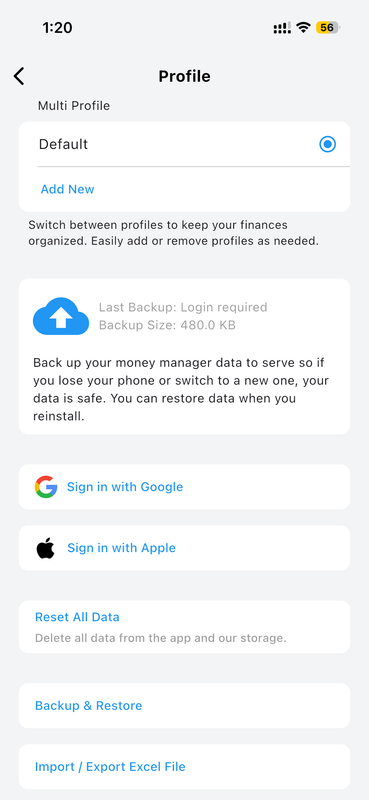
Creating additional profiles is instant and entirely painless. Assign distinct naming conventions for different functions—like 'Personal Accounts', 'Startup Expenses', or 'Travel Fund'. By properly establishing distinct profile containers, you guarantee that transactions never blend erroneously in global reports, preserving perfect accuracy.
Fast Profile Switching
There's no necessity to continuously log out of accounts. Easily toggle between your distinct ledgers using the built-in profile selector tool. As you jump back and forth, the complete dashboard environment organically rebuilds to actively reflect the designated book, enabling highly flexible real-time accounting across multiple domains.
Independent Configuration
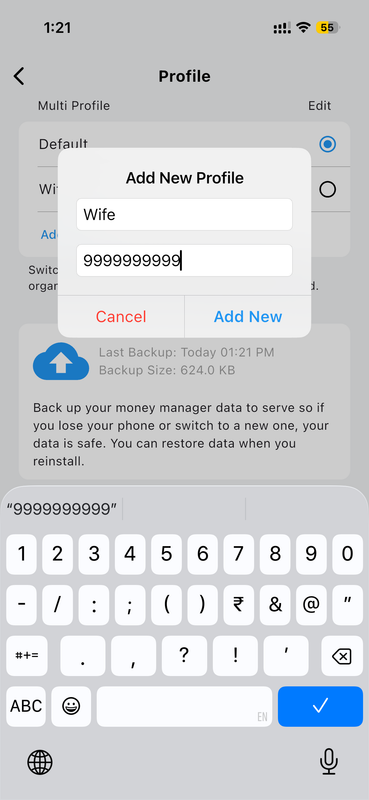
Control isn't just about distinct transactions. Adjust fundamental settings logically on a per-profile basis. One profile can operate directly in US Dollars using strict business tax categories, while an adjacent profile handles personal groceries tracked natively in Euros. Generate perfectly separated reports precisely customized to the distinct profile scope.
How to Setup a New Profile
-
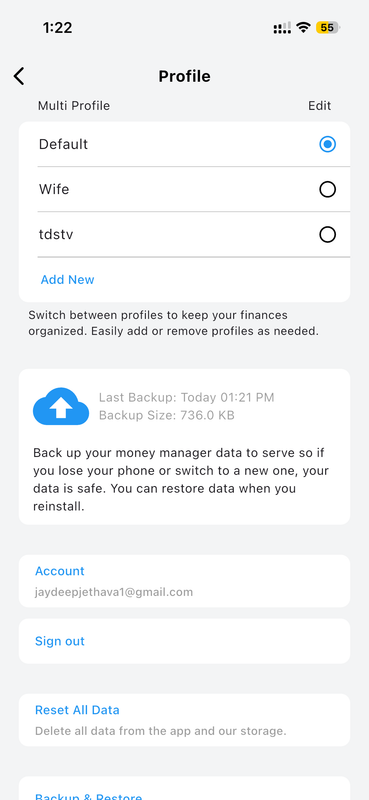
Navigate to Settings Matrix Open the side menu navigation block and specifically tap the "Profile Management" header.
-
Launch Creation Tool Tap securely on the prominent "+" button prominently located perfectly within the profile manager.
-
Define Attributes Establish an identifying name and securely choose baseline configuration choices suitable to the new domain.
-
Seamless Toggle Successfully transition your active book instantly by merely tapping perfectly onto its newly generated identity block.